
The easiest way to plan your home wiring
Plan Your Home
Wiring in Minutes
No experience needed. Upload your floor plan, drag & drop outlets, switches and lights, then hand your electrician a professional PDF.
Everything You Need to Plan Your Wiring
From the first outlet to a finished electrical plan — in just minutes.
Upload or Draw Your Floor Plan
Upload your floor plan as PDF, JPG, or PNG — or draw rooms, walls, doors, and windows directly in the built-in editor. No floor plan? No problem.
Drag & Drop Symbols
Over 25 standard electrical symbols: outlets, switches, lights, smoke detectors, and more — just drag them onto your plan.
Custom Symbols & AI
Generate custom symbols with AI, upload your own SVGs, or draw them by hand. Plus AI-powered suggestions for optimal outlet and switch placement.
Connect Switches to Lights
Link switches to lights with a single click. Connection lines show your electrician exactly what goes together.
Share with Your Electrician
Create sharing links for your electrician — view-only or collaborative editing. They'll see exactly what you need.
Professional PDF Export
Export your plan as a professional PDF with a complete symbol legend — quantities included. Perfect for printing or sending to your contractor.
Your Wiring Plan in 3 Easy Steps
Planning your home's electrical layout has never been this simple.
Upload or Draw Your Floor Plan
Upload an image or PDF of your floor plan — or draw rooms, walls, doors, and windows right in the built-in editor. For PDFs, just pick the page you need.
Place & Connect Symbols
Drag outlets, switches, and lights onto your plan. Connect switches to fixtures to define your circuits. AI helps you find the optimal placement.
Share & Export
Share your finished electrical plan with your electrician via link — view-only or collaborative. Export as a professional PDF with symbol legend included.
Free plan available — start in seconds
See It in Action
Drag & drop symbols, connect switches to lights, and export a professional PDF — all in your browser.
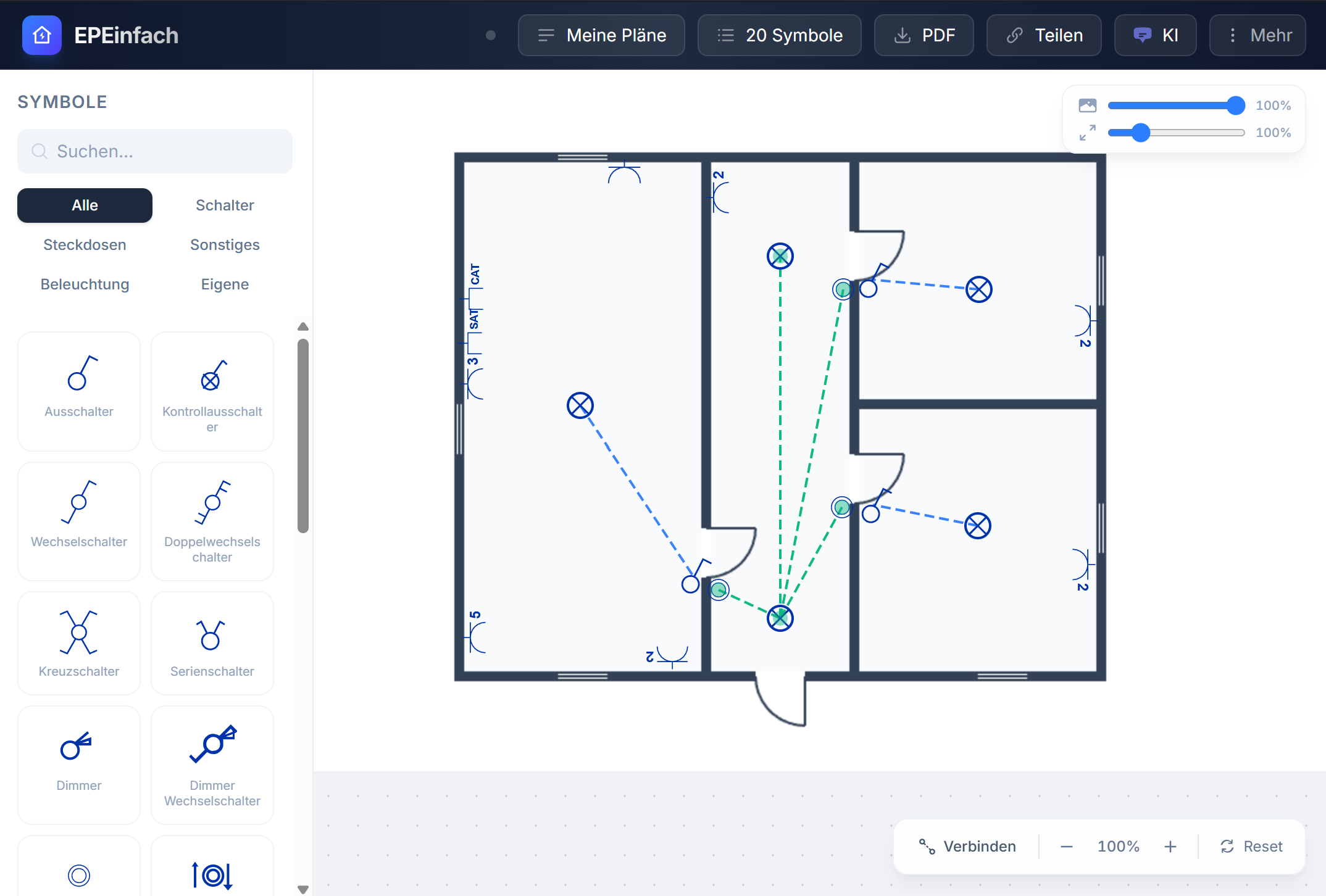
Free plan includes 40 symbols and 1 saved plan.
Simple, Honest Pricing
Start free — upgrade only when you're ready.
Free
$0
To try it out
- Up to 40 symbols
- Upload, draw & crop floor plans
- Save 1 plan
- 5 AI suggestions
Starter
$9.99/month
Perfect for a single project
- 1 plan
- Unlimited symbols
- PDF export with symbol legend
- Version history
Pro
$19/month
Cancel anytime · 14-day money-back guarantee
- Unlimited plans
- Unlimited symbols
- PDF export with symbol legend
- Custom symbols (AI, Upload, Draw)
- Version history & sharing
Built for DIY Homeowners
Whether you're building new, renovating, or just adding outlets — PlanMyWiring makes it easy to communicate with your electrician.
New Construction
Plan every outlet, switch, and light before the walls go up.
Renovations
Map out electrical changes for your kitchen, bathroom, or basement remodel.
Additions & Garages
Extend your electrical plan for additions, garages, workshops, or sheds.
Guides & Resources
Everything you need to know about planning your home's electrical layout.
Important: PlanMyWiring is a planning tool only and does not replace a licensed electrician. All electrical work must be performed by a qualified professional in accordance with the National Electrical Code (NEC) and local building codes. Always consult your electrician before making changes to your home's electrical system.
Ready to Plan Your Wiring?
Start free today and create a professional electrical plan for your home — no experience needed.